
Live Event WiFi Deployment: The Field Guide
How to plan and deploy WiFi for a live event: capacity math, AP counts, RF settings, segmentation, roaming and day-of ops. With a printable checklist.
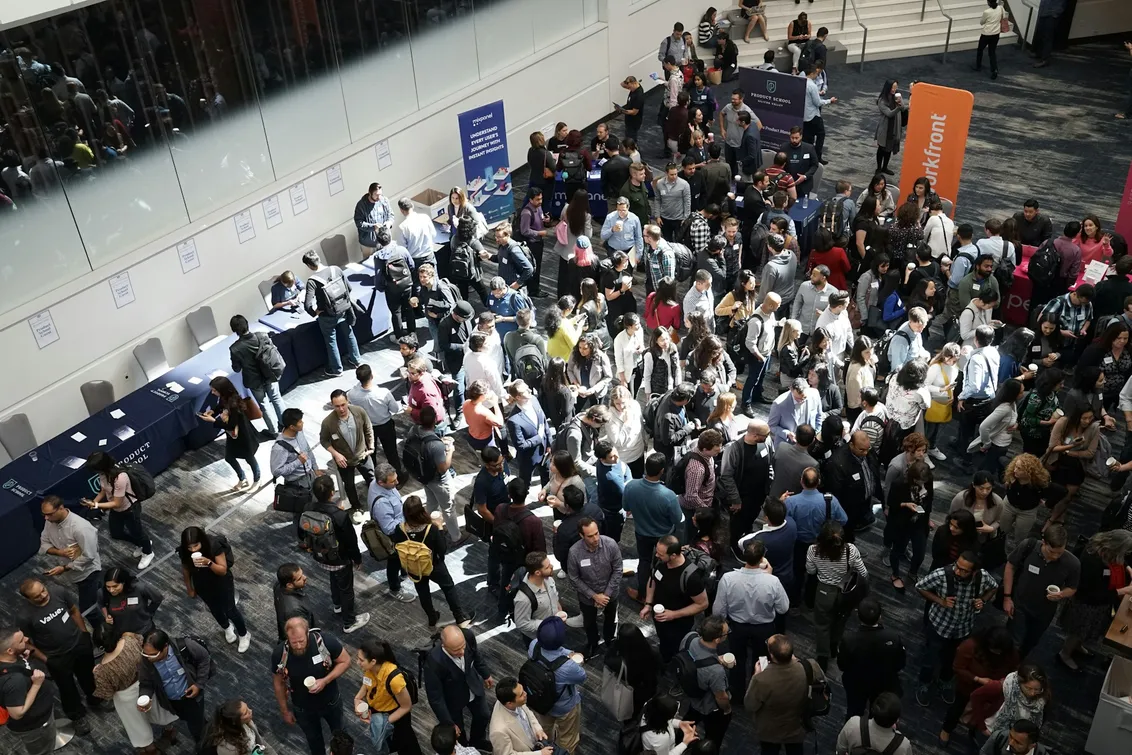
Event WiFi has a reputation problem, and it earned it honestly. Most of us have stood in a conference hall watching a spinner, surrounded by two thousand people doing the same. The physics of that room are hard, but they are not mysterious. Almost every event network that falls over falls over for one of a handful of predictable reasons, and every one of them is avoidable at the planning table, days before the first flight case rolls off the truck.
This guide is the deployment playbook we wish someone had handed us years ago. It is written for the people who actually build these networks: AV and IT contractors, venue technical teams, and the unlucky organiser who just found out that “the WiFi” is now their job. It is hardware-agnostic. Everything in it can be done with any serious equipment, by hand, if you have the time. Where we give numbers, they are opinionated on purpose. Hedge-everything guides do not help anyone at midnight before a load-in.
The short version
If you read nothing else, deploy against these rules:
- Plan for 70 to 80 percent of headcount connected at peak for conferences and expos, 40 to 60 percent for concerts and social events.
- Budget 2 to 4 Mbps per guest. Airtime, not raw bandwidth, is your real constraint.
- Plan around 60 to 100 active clients per radio. Ignore the association limit on the datasheet.
- More small cells at low power beats fewer loud APs. Spread the client load across devices.
- 5GHz carries the event. 6GHz is your cleanest spectrum where clients support it, but plan for its shorter reach.
- Stay on narrower channels in dense zones. You care about many users connecting reliably, not one user’s speed test.
- Press, production and payments need priority, not just separation. A VLAN alone does not protect them.
- Roaming quality decides the guest experience. A network that cannot hand clients off cleanly is a network that does not work, whatever the throughput numbers say.
- Preload the captive portal before doors open and size DHCP at twice your expected peak.
- Teardown is part of the deployment, not what happens after it.
The rest of this guide walks the event timeline: plan, stage, install, doors open, show time, teardown.
Plan: do the capacity math
Every failed event network we have seen was under-planned, not under-specced. The math takes twenty minutes and it decides everything downstream: AP count, placement, channel plan, backhaul contract.
How many people will actually connect
Attendees are not clients. The take rate depends on the event:
- Conferences, expos, trade shows: 70 to 80 percent of headcount at peak. These crowds are working. Laptops, phones and often a tablet per person, and they arrive expecting to upload, demo and video-call.
- Concerts, weddings, social events: 40 to 60 percent. People are there for the event, not the internet, but the spikes are sharper: doors, intermission, the headline moment when ten thousand phones start uploading video simultaneously.
Err on the high side. At any large gathering the cellular network degrades as towers saturate, which pushes people onto your WiFi precisely when it is busiest. Your network inherits the carriers’ failure.
Each connected person also brings more than one radio. Count 1.2 to 1.5 devices per connected attendee at a working event once laptops and wearables join.
How much per client
2 to 4 Mbps per general guest covers messaging, social, uploads and standard-definition streaming comfortably. Resist the urge to promise more. The constraint in a dense room is not the pipe, it is airtime: every transmission occupies the channel for everyone on it, and a handful of clients pulling 50 Mbps can starve a hundred clients trying to load a boarding pass. Per-client rate limiting is not stinginess, it is fairness enforcement, and it is the single most effective quality lever you have.
Clients per radio
Datasheets love to advertise 200+, sometimes 500+, associated clients per access point. Association is not service. The most misleading number in event WiFi is the association limit, because an AP can hold hundreds of idle associations while delivering usable service to a fraction of them.
Plan around 60 to 100 active clients per radio, and use the lower end of that range for zones where clients are doing real work (a press pit, a demo floor) and the higher end for zones where most traffic is light and bursty.
A worked example: 2,000-person expo
| Input | Value |
|---|---|
| Headcount | 2,000 |
| Expected peak take rate | 75% → 1,500 people |
| Devices per connected person | 1.3 → ~1,950 clients |
| Per-client budget | 3 Mbps |
| Planning load per radio | 80 clients |
| Radios required | ~25 |
| Dual-band/tri-band APs required | 14 to 18, placed by zone |
Zone it rather than averaging it. The entry hall takes the association storm at doors. The main floor holds the sustained load. The food court peaks at lunch, the keynote room peaks twice a day and is empty otherwise. An even grid of APs is a plan for an even crowd, and there is no such thing.
Backhaul sizing falls out of the same numbers, with one mercy: not everyone transmits at once. A 10:1 to 20:1 oversubscription against the theoretical sum is normal. For this expo, 300 to 500 Mbps of real, tested backhaul is a sane target. (Provisioning the backhaul itself is out of scope for this guide; we are assuming you have a line, bonded cellular, or fibre already arranged.)
How this changes by event type
The framework holds everywhere; the numbers and the failure modes move. What to expect:
| Event type | Take rate | Spike shape | Dominant zone | Hardest problem |
|---|---|---|---|---|
| Expo / trade show | 70 to 80% | Doors surge, then sustained all day | Demo floor | Exhibitor and press uplink surviving guest load |
| Conference | 70 to 80% | Synchronised: every break moves everyone at once | Keynote hall | Roaming as rooms empty and refill in minutes |
| Concert / festival | 40 to 60% | Extreme bursts: doors, intermission, encore | Pit and GA front | Association storms plus a wall of body attenuation |
| Wedding / social | 40 to 60% | Photo moments and speeches | One room | Photographer and vendor priority on a modest pipe |
Read your event’s row, then apply the rest of the guide with those numbers in hand.
Plan: placement and the empty-venue lie
Two principles carry almost every placement decision.
More small cells at low power beats fewer loud APs. It is tempting to cover a hall with four APs at full transmit power. Coverage will look perfect on the survey. Then the room fills, all four radios saturate, and there is nowhere for the load to go. Many APs at low power (10 to 14 dBm, roughly matching a phone’s transmit power) create small cells that spread the client load across many radios, which is the entire game. A client five metres from a quiet AP gets better service than a client thirty metres from a loud, drowning one.
The empty venue lies to you. A human body is 3 to 5 dB of attenuation at these frequencies; a crowd is a wall of water. The pristine coverage map you measured on Wednesday afternoon does not exist on Saturday night. Mount APs overhead wherever rigging allows, so signals travel over the crowd instead of through it. Tripod-mounted APs at head height are a last resort; they serve the ten people standing nearest and lose everyone behind them.
Overhead has a ceiling, literally. Expo halls and arenas often put the rigging at 10 metres or more, and every metre of height is distance you have inserted between the AP and every client it serves. The trap is that the failure is asymmetric: the AP transmits with decent power through a decent antenna, but the phone answers with a fraction of that through a terrible antenna held against a body. A high-mounted network surveys beautifully, because a survey measures the downlink, and then collapses under load as uplink retries pile up. So the placement ladder is:
- 3 to 6 metres is the sweet spot: trussing, poles, columns, booth structures. Above the crowd, still within reach of a phone’s weak uplink. At an expo, booth builds and pipe-and-drape rigs give you this for free if you claim the positions early.
- If the ceiling is all you get, change the antenna, not the strategy. Directional patch or narrow-beam antennas aimed down claw back the path loss with gain, and their tight footprint recreates the small, defined cells that height otherwise destroys. This is how arenas do it.
- What you never do is hang omnidirectional APs at 10-plus metres. An omni at height creates one giant, sloppy cell that hears clients from three zones away, which undoes the entire small-cell plan in a single mounting decision.
Survey with the staging in place if you possibly can. LED walls, metal trussing and scaffolding reshape propagation, and they usually arrive after the site visit.
Stage: configure in the warehouse, not the venue
The venue gives you hours; the warehouse gives you days. Every minute of on-site configuration is a minute stolen from the things you can only do on site: physical placement, cable runs, and verification.
Before the truck leaves:
- Every AP configured, named by zone, firmware-matched and labelled to match the floor plan.
- SSIDs, VLANs, rate limits and RADIUS/portal settings applied and tested against a bench setup.
- A printed (yes, printed) floor plan with AP positions, channel assignments and switch port mapping. Venues eat laptop batteries and cellular coverage.
- Spares: at least 10 percent extra APs, pre-configured as hot swaps, plus the cables, injectors and mounts to deploy them.
The install-day test is simple: if a box can be plugged in by someone who has never seen the configuration, staging was done right.
Install: RF settings that survive a crowd
The dense-venue RF playbook is short and unglamorous, and skipping any line of it is how networks die at 2pm on day one.
5GHz carries the event. It has the channels, the client support and the capacity. Design as if it is the only band, then treat everything else as auxiliary.
Deploy 6GHz where you can. WiFi 6E and WiFi 7 clients now make up a meaningful share of any professional crowd, and 6GHz is the cleanest spectrum at any event: no legacy devices, no hotspot pollution, wide open channels. Its physics cut both ways, though. 6GHz propagates noticeably shorter range than 5GHz and gives up more to obstruction, so it is not a drop-in replacement: plan tighter cell spacing for it, or treat it as a capacity layer in your densest zones (press areas, demo floors) rather than a coverage layer. Offloading the newest, most capable clients onto 6GHz also quietly relieves 5GHz for everyone else. One interaction to respect: 6GHz is the most height-sensitive band of the three, so it pays the high-ceiling penalty hardest. If your only mounting option is up high, 6GHz needs the directional-antenna treatment even more than 5GHz does.
2.4GHz is either off or quarantined. At an event it is a war zone of personal hotspots, Bluetooth and wireless production gear. If legacy devices or payment terminals need it, give it a dedicated SSID at minimum power and keep guests off it.
Stay narrow on channel width. 20MHz channels in dense zones is our default, 40MHz where density is moderate. Wide channels buy individual throughput at the cost of channel reuse, and at an event you care much less about each user’s throughput than about the number of users the room can hold cleanly. This one is genuinely subjective, and if your event is a small workshop where forty people need fast transfers, go wide. In a dense hall, go narrow and take the reuse.
Kill the legacy floor. Disable 802.11b rates and set the minimum basic rate to 12 or 24 Mbps. Slow clients transmit for longer, and airtime is the shared resource; one 1 Mbps client at the edge of a cell degrades the channel for everyone on it. Set a minimum RSSI so clients are nudged to a nearer AP instead of clinging to a distant one.
Cap the SSID count. Every SSID beacons on every radio, and beacons are pure overhead. Three to four SSIDs per radio is a sane ceiling; each additional one taxes every client in range whether they use it or not.
Install: segmentation, and why a VLAN is not enough
An event network is at least four networks wearing one set of hardware:
- Guest: isolated client-to-client, rate-limited, internet-only.
- Production: show control, streaming encoders, AV. Never shares airtime priority with guests.
- Press and photographers: their uploads are the event’s public record, on deadline.
- Payments and POS: small traffic, zero tolerance for failure.
VLAN separation is the obvious first step, and it is not sufficient. A VLAN gives press their own broadcast domain and address space, but at the radio and the uplink they are still queuing behind two thousand guests. Separation without prioritisation just means their traffic fails on its own dedicated network.
The classes that matter need actual QoS: WMM priority at the radio, queue priority at the switch and gateway, and bandwidth reservations that hold under guest saturation. The test is brutal and simple: at absolute peak guest load, can a photographer push a 2GB card to an editor, and does a card machine complete a transaction on the first try? If the answer depends on how busy the guests are, the segmentation is decorative.
Where the venue allows it, put press and production on their own radios or their own band entirely (this is a natural use of that 6GHz capacity layer). Airtime you never contend for is the only airtime you can promise.
Doors open: surviving the surge
Guests forgive a queue at the bar; they never forgive a login page that will not load. The first ten minutes after doors are the network’s real stress test, and it is not a bandwidth test, it is an onboarding test.
DHCP first. Size the pool at twice your expected peak associations, with leases of 30 to 60 minutes. Gate churn, people connecting, wandering out for a call, reconnecting, exhausts tight pools fast, and DHCP exhaustion presents as “the WiFi is broken” while every dashboard shows green.
The captive portal is the perceived quality of the entire network. Whatever the backend, the splash page must be paint-fast and lightweight, and it must be warm before the first guest arrives, not compiling itself when the first phone connects. If the portal stack has a cold-start behaviour, trigger it yourself before doors. Keep the page under a couple of hundred kilobytes, host its assets locally or on fast edge infrastructure, and make the auth flow survive a thousand submissions in a ten-minute window. A beautiful portal that takes eight seconds to render has already told every guest the network is broken, regardless of what the network can actually do.
Watch the walk-in on a live view. Association counts per AP during the first thirty minutes tell you immediately whether the load is spreading the way the plan said it would, and doors-open is when a mis-aimed antenna or a dead switch port announces itself.
Show time: roaming is the whole ballgame
Here is the uncomfortable truth about dense-venue WiFi: you can get every setting above right and still deliver a miserable experience if roaming is broken. Event guests move constantly, between halls, to the food court, back for the keynote, and every one of those walks is a series of handoffs between access points.
The failure mode is the sticky client: a phone that associated at the entrance and clings to that AP from across the building, hammering out retries at the lowest rates, degrading its own experience and burning airtime for everyone still near the door. Multiply by a few hundred and a well-designed network performs like a broken one.
Well-implemented roaming is paramount, and it is a system property, not a checkbox:
- 802.11k and 802.11v on, always. Neighbour reports and BSS transition steering give clients the information and the nudge to move to the right AP before they degrade.
- 802.11r (fast transition) is worth it, tested. It cuts re-authentication during handoff to near-imperceptible, which matters enormously on portal- or RADIUS-authenticated networks. But it still confuses some older clients, so test with the oldest devices you realistically expect in the crowd before you commit.
- Minimum RSSI and band steering do the pushing where clients will not listen: shed clients that have drifted too far, and lift capable clients up to 5 and 6GHz.
- Consistent everything. Same SSID, same security, same VLANs everywhere the client roams. Any inconsistency between APs turns a 50-millisecond handoff into a full reconnect through DHCP and the portal, in the middle of someone’s video call.
Walk the floor during the event with a phone and watch it hand off. If you can cross the venue on a video call without a stutter, the network is doing the hardest thing it will be asked to do.
Show time: operating from the floor
Nobody at a live event is sitting at a NOC. Whoever is watching the network is doing it from a phone, standing behind a stage, mid-conversation with a stressed producer. Plan the observability accordingly:
- One live view: active clients, per-AP load, uplink utilisation. Big numbers, glanceable.
- Alerts pushed, not polled: an AP going dark should find you; you should not be refreshing dashboards to find it.
- The mid-event fixes worth knowing by heart: swap a failed AP for a pre-configured spare, drop transmit power in a zone where cells are colliding, tighten guest rate limits when the uplink runs hot, and steer around a saturated zone by nudging minimum RSSI. Every one of these is a two-minute change if it was staged, and a truck roll if it was not.
Teardown: end it like you mean it
The event ends; the network’s obligations do not, unless you end them deliberately. Teardown is a feature of the deployment, not a footnote:
- Access codes and portal sessions expire when the event does. Nothing left open, nothing to remember to close.
- Guest data has a retention story. A pop-up network should keep data for days, not quietly forever, and whatever the organiser needs (attendance, portal analytics, sponsor reporting) should be exported and delivered as a wrap-up report before the data ages out.
- Hardware comes back tested and reset, and the event’s configuration is archived, because the fastest way to plan the next event is to clone the last one.
The next event deserves a clean slate, and so does this one’s data.
Doing all of this without doing all of this
Everything in this guide can be built by hand, and for years that is exactly how we did it. It is also exactly why we built Live Events into Halo Cloud: an event becomes an object with a start and an end, any device you plug in on site finds its event and configures itself, the portal is themed once and preloaded before doors, the live capacity view is designed for a phone held in one hand behind a stage, and when the event ends the teardown, code expiry and wrap-up report happen on their own. If you would rather spend load-in day on placement and cable runs instead of configuration, that is what it is for. And if you are running an event soon, book a demo and we will spin up a pop-up network live on the call.
Frequently asked questions
How many access points do I need for 1,000 people?
Start from clients, not people: at a working event, plan for 70 to 80 percent take rate and ~1.3 devices each, so roughly 950 to 1,050 clients. At 60 to 100 active clients per radio, that is 10 to 16 radios, so 6 to 10 dual-band APs, placed by zone rather than spread evenly. Concerts and social events need roughly half that.
How much bandwidth does event WiFi need?
Budget 2 to 4 Mbps per connected guest, then apply 10:1 to 20:1 oversubscription for backhaul, since not everyone transmits at once. A 2,000-person expo lands around 300 to 500 Mbps of real, tested capacity. In the hall itself, airtime runs out before bandwidth does.
Should event WiFi use 2.4GHz?
Mostly no. At an event, 2.4GHz is saturated by personal hotspots and production gear. Run the event on 5GHz, add 6GHz for capacity in dense zones, and keep 2.4GHz off or reserved for legacy devices and payment terminals at minimum power.
Why is the WiFi slow even though the internet line is fast?
Because the constraint is airtime, not the pipe. Every transmission occupies the radio channel for everyone on it, so slow and distant clients, wide channels and unmanaged roaming can exhaust a cell while the uplink sits half idle. Small cells, narrow channels, rate limiting and working roaming fix more events than bigger internet lines do.